
USDC has become one of the most widely used cryptocurrencies in this digital money space, including on crypto-powered gambling platforms. Its stable value, pegged to the US dollar, makes it easy to manage funds and use for betting without worrying about price swings. Fast transaction times and low network fees further enhance its appeal. Read on to learn how to onboard USDC safely and efficiently for casino games.
What You Need Before Depositing USDC
Depositing USDC at a crypto casino is generally straightforward, but a few basic checks can save you from unnecessary delays or mistakes. USDC operates across multiple blockchain networks, so preparation matters more than with single-chain cryptocurrencies.
Before sending any funds, ensure your wallet, network selection, and deposit amount meet the casino’s requirements.
A Wallet That Supports USDC
To deposit USDC, you’ll need a wallet or account that supports USDC on the same blockchain network used by the casino. Most modern wallets support USDC, but some networks might not be enabled by default.
Convenience and compatibility are what matter for casino play. A good wallet should allow you to easily switch networks, copy addresses, and send coins without friction.
See the overview of the crypto wallets most used for USDC gambling activities.
| Wallet / Account | Best For | Key Advantages |
|---|---|---|
| MetaMask | Everyday USDC casino deposits, Web3 apps |
- Widely supported EVM wallet - Works with ERC-20, Polygon, Optimism, Base - Easy network switching - Strong desktop & mobile UX |
| Trust Wallet | Mobile-first players and beginners |
- Supports multiple USDC networks - Simple interface for quick deposits - Good compatibility with mobile casinos - No setup complexity |
| Phantom Wallet | Solana-based USDC casino play |
- Optimized for Solana USDC - Very fast transactions, low fees - Clean and intuitive interface - Popular with Solana casinos |
| Exchange Account (e.g. Binance, Coinbase) | Occasional deposits without self-custody |
- No wallet setup required - Direct USDC withdrawals to casinos - Suitable for small or infrequent deposits - Less control over networks and fees |
Enough USDC to Meet the Minimum Deposit
Crypto casinos typically set a minimum deposit for USDC, typically $5–$20, depending on the platform and network.
Submitting less than the minimum may prevent the deposit from being credited automatically. Always check the casino’s deposit page before sending funds.
Where to Get USDC for Casino Play
If you don’t already hold USDC, there are two common ways to acquire it before depositing it into a casino.
Many players prefer exchanges for simplicity, while others swap directly inside their wallet if they already hold crypto. Both options work, provided USDC is deployed to the correct network.
- Buying USDC on an exchange – Often the simplest option, especially for beginners who want to convert fiat or other crypto directly into USDC.
- Swapping USDC inside a wallet – A convenient choice if you already hold crypto and want to convert it to USDC without using an exchange.
Pick the option that suits you best, but make sure you understand the risks and limitations of each approach.
How to Deposit USDC Step by Step
Once your wallet is ready and funded, depositing USDC follows the same general process across most crypto casinos.
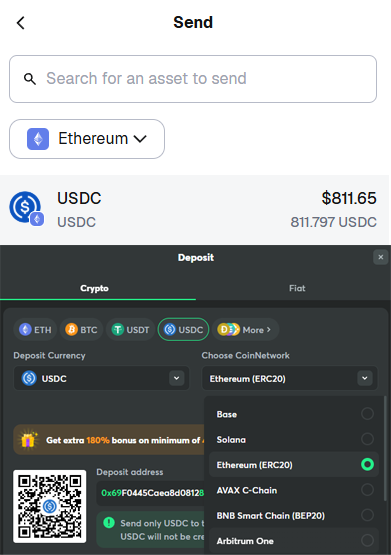
The most important part is matching the network shown on the casino’s deposit page with the network selected in your wallet. This single step prevents most failed or delayed deposits.
Sending USDC From Your Wallet
Open your wallet, select USDC, and choose the send option. Paste the casino’s deposit address, confirm the network, and enter the amount.
Before confirming, double-check the address and network one final time. USDC transactions are typically fast, and once sent, they cannot be reversed.
How to find your casino deposit address? Inside the casino’s cashier section, select USDC as your deposit currency. The platform will generate a unique deposit address and the supported blockchain network.
Withdrawing USDC From a Crypto Casino
Once you’ve finished playing and want to cash out your winnings or a portion of your balance, the withdrawal process is similar, but in reverse. Select USDC as the withdrawal currency, choose a supported network, and send the funds back to your wallet. As with deposits, selecting the correct network is essential.
Common USDC Deposit Issues and How to Avoid Them
Crypto transactions, including USDC, are generally reliable, but most problems stem from small oversights rather than technical failures. Understanding the most common issues can help you avoid delays and ensure your funds are credited smoothly.
Taking a moment to review the deposit details before sending USDC is often enough to prevent problems altogether.
Wrong Network, Fees, or Deposit Amount
The most common issue with USDC deposits is selecting the wrong blockchain network. Even if the wallet address is correct, sending USDC to an unsupported chain will prevent the casino from automatically detecting the deposit.
Another common issue is overlooking network fees, minimum deposit requirements, or the selected token. USDC and USDT are often listed side by side, and choosing the wrong one can delay or block the deposit. Always confirm the token, supported network, and minimum amount on the casino’s deposit page before sending funds.
What to Do If Your USDC Deposit Doesn’t Arrive
If your USDC deposit doesn’t appear right away, the first step is to be patient. On occasion, it may take longer to confirm transactions.
If the deposit still doesn’t show up after a reasonable time, check the transaction status on the relevant blockchain explorer using your transaction ID. If the transaction is confirmed on-chain, contact the casino’s support team and provide the transaction hash. In most cases, the issue can be resolved once the deposit is manually reviewed.
Summary
USDC offers a practical and predictable way to fund crypto casino accounts, thanks to its stable value and efficient transactions. By using a compatible wallet, selecting the correct network, and double-checking deposit details, you can avoid most common issues.
For beginners and experienced players alike, careful preparation and attention to small details make USDC deposits smooth, reliable, and easy to manage.
Explore our updated list of USDC casinos.
FAQ
Which USDC network should I use for casino deposits?
Use the same USDC network that the casino shows on its deposit page.
USDC exists on multiple blockchains (e.g., Ethereum, Solana, Polygon, Tron, Base, Arbitrum). If you choose a different network in your wallet than the one selected at the casino, the deposit may not be credited automatically.
Can I deposit USDC directly from an exchange?
Yes — as long as you select the correct network during the withdrawal.
Exchanges often support multiple USDC networks. Always match the casino’s network and double-check minimum deposit requirements before sending funds.
What is the best wallet for depositing USDC at crypto casinos?
The best wallet is the one that supports the casino’s USDC network with minimal friction.
MetaMask is popular for EVM networks (Ethereum, Polygon, Base, Arbitrum), while Phantom is a common choice for Solana-based USDC. Trust Wallet is a solid mobile option across multiple networks.
How long do USDC casino deposits take?
Most deposits are credited within minutes, but it depends on the network and the casino.
Low-fee networks typically settle faster, while some casinos may require additional confirmations before crediting your balance. Network congestion can also cause delays.
Why didn’t my USDC deposit arrive?
The most common reasons include:
- USDC was sent on the wrong network
- The deposit was below the casino’s minimum amount
- The casino requires confirmations and you checked too early
- The transaction is confirmed on-chain but not credited yet
Check the transaction hash in a blockchain explorer. If it’s confirmed, contact support and share the transaction ID.